Disclosure: we built and sell the Apify Actor whose code this post walks through, Image & Scanned PDF OCR (publisher WrenTools). The post was written with AI assistance and reviewed by a person before publishing. Every output below was produced by running that code.
In short: a scanned PDF page has no text layer, so render it to an image with pypdfium2 and read it with Tesseract. Render at 300 dpi. On our test page, 72 dpi lost all the small print and turned "9:00" into "2:00". 150 dpi read "Fine print" as "Fine pint". 300 dpi read every line exactly, in about twice the time of 150. Ask Tesseract for TSV output: each word's confidence lets you flag the misreads it does make.
When a PDF comes from a scanner or a phone app, each page is a picture. Text extraction returns nothing, because there is no text in the file, only pixels. You have to draw each page and read the pixels back with OCR.
Here is how our OCR Actor does it in Python, and what we measured when we changed the one setting that matters most, the resolution.
How do you tell a scanned page from a text page?
Ask the PDF for its text layer. With pypdfium2:
import pypdfium2 as pdfium

pdf = pdfium.PdfDocument("scan.pdf")
page = pdf[0]
page.get_textpage().get_text_range()
''
Our test page is a Letter page scanned at 200 dpi. It holds a notice at body size, two lines of small print (about 7 pt) and one line of fine print (about 5 pt), on off-white paper with speckle and a 1.2 degree tilt, like a phone scan. Its text layer is empty, so OCR is the only way to read it.
Draw the page, then read it with Tesseract
PDF pages are measured in points, 72 to the inch, so a scale of dpi / 72 draws the page at the resolution you want. Greyscale is enough for OCR:
dpi = 300
img = page.render(scale=dpi / 72, grayscale=True).to_pil()
img.save("page.png")
Then run the tesseract program on the image. We ask for TSV rather than plain text, because TSV gives every word with its position and a confidence from 0 to 100:
import subprocess

args = ["tesseract", "page.png", "stdout", "-l", "eng", "--psm", "3", "--dpi", str(dpi), "tsv"]
tsv = subprocess.run(args, capture_output=True, timeout=180).stdout.decode("utf-8", "replace")
--psm 3 is Tesseract's automatic page layout. We pass --dpi because we know it; without it Tesseract estimates the resolution. On this page, leaving it out gave the same text, with two paragraph breaks in different places.
Which resolution? We measured it
Predict: before you look at the chart, guess two things. What happens to the 5 pt fine print at 72 dpi, and how much longer does a page take at 300 dpi than at 150? Then check your guess against the figure.
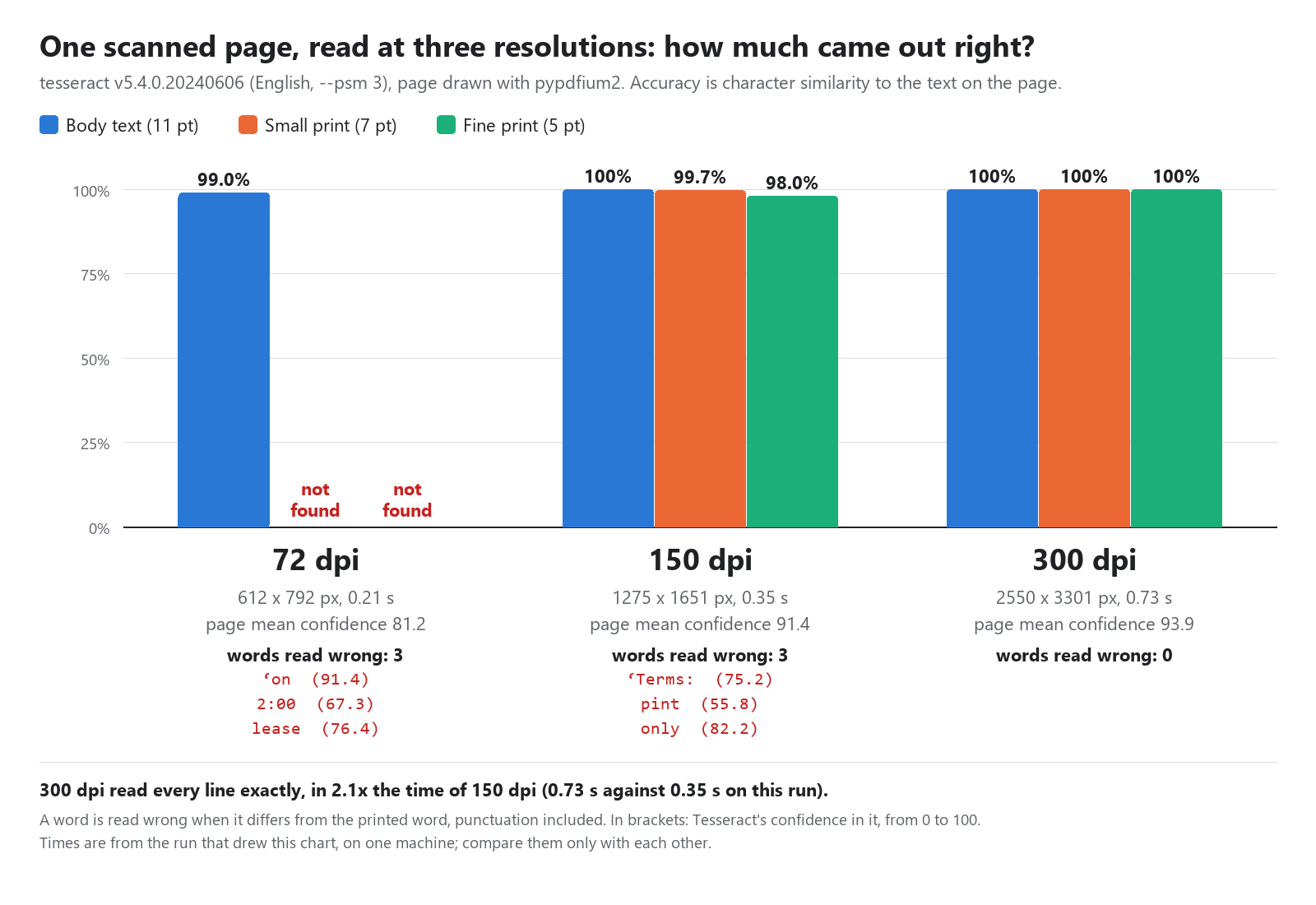
The same page, drawn at three resolutions and read with Tesseract 5.4 (English):
| Drawn at | Image size | Time | Body text | Small print (7 pt) | Fine print (5 pt) |
|---|---|---|---|---|---|
| 72 dpi | 612 x 792 | 0.37 s | 99.0% | not found | not found |
| 150 dpi | 1275 x 1651 | 0.48 s | 100% | 99.7% | 98.0% |
| 300 dpi | 2550 x 3301 | 1.02 s | 100% | 100% | 100% |
(Accuracy is character similarity to the text we drew. Times are on one machine and are only for comparing the rows.)
At 72 dpi, both lines of small print are simply missing, and the body text has a silent error:
‘on Tuesday 4 November from 2:00 to 13:00.
lease store drinking water in advance.
The page says 9:00. A wrong number that still looks like a number is the worst kind of OCR error, because nothing downstream notices it.
At 150 dpi the body and the small print are right, and the fine print comes out as:
Fine pint this offer is valid for orders placed before 31 March 2027 only
At 300 dpi every line is exact:
Fine print: this offer is valid for orders placed before 31 March 2027 only.
300 dpi took about twice as long as 150 here. We use 300 for every page, because the small print on a page is often the part someone needs, such as terms, reference numbers and dates.
Use word confidences to catch misreads
Each TSV row is one word (level 5), with its block, paragraph and line numbers, its box and its confidence. Not every misread scored low: at 72 dpi ‘on (a stray mark before "on") scored 91.4, and at 150 dpi only ("only." without its full stop) scored 82.2. The wrong time and the misread word in the fine print did:
| Resolution | Word read | Should be | Confidence |
|---|---|---|---|
| 72 dpi | 2:00 |
9:00 | 67.3 |
| 150 dpi | pint |
print: | 55.8 |
So a confidence threshold makes a good review flag. It is not a verdict, though. At 300 dpi, "offer is" was read correctly with a confidence of 10.5. Flag low words for a person to check, and don't delete them.
We also report a character-weighted mean confidence per page (81.2 at 72 dpi, 91.4 at 150, 93.9 at 300). A low page mean is a quick sign that a page needs a second look.
Rebuild the lines from the TSV
The TSV keys (block, paragraph, line) give you the layout back. Words with the same key share a line, and a new block or paragraph starts a new paragraph:
def parse_tsv(tsv):
    words, lines, last = [], [], None
    for row in tsv.splitlines()[1:]:
        cols = row.split("\t")
        if len(cols) < 12 or cols[0] != "5":       # level 5 = a word
            continue
        text, conf = cols[11].strip(), float(cols[10])
        if not text or conf < 0:
            continue
        key = (int(cols[2]), int(cols[3]), int(cols[4]))  # block, paragraph, line
        words.append((text, conf))
        if last is not None and key[:2] != last[:2]:
            lines.append("")                         # blank line between paragraphs
        if key != last:
            lines.append(text)
        else:
            lines[-1] += " " + text
        last = key
    return words, "\n".join(lines).strip()
Guard rails worth having
- Very large pages. A poster drawn at 300 dpi can run to hundreds of megapixels. We scale anything over 40 million pixels down before OCR, and mark that page as scaled. Pillow's decompression-bomb check refuses an image file over 400 million pixels without decoding it.
- Access controls. A PDF whose owner has turned off copying (permission bit 5) is refused. Drawing it and reading the pixels back would extract the same text by a different route. A PDF that needs a password is refused too, and the tool takes no password input.
- One thread. On a machine with a fraction of a core, Tesseract's OpenMP threads only compete with each other, so we set
OMP_THREAD_LIMIT=1.
What this doesn't do
- Layout. You get lines and paragraphs, not tables or columns as structure.
- Handwriting. We haven't tested it, and Tesseract is built for printed text.
- Text PDFs. If a page already has a text layer, extract it instead (see our post on rebuilding Markdown from font sizes). It's faster and it's exact.
Try it
The whole thing is about 230 lines of core.py. The Actor has 27 Tesseract languages installed and reads images (PNG, JPEG, TIFF, WebP and more) as well as PDFs. The GitHub example sends a list of PDF and image links to it and saves the text. It costs $0.003 a page.
What resolution do you scan or render at, and have you found a case where 300 dpi wasn't enough? I'd like to hear it in the comments.
Comments
Join the discussionNo comments yet. Be the first to comment.