Disclosure: we built and sell the Apify Actor this post compares against, Merge & Dedup Datasets, CSV, JSON & Excel Files (publisher WrenTools). The post was written with AI assistance and reviewed by a person before publishing. Every output below was produced by a script that ran pandas 3.1.0 and that Actor's own code on the two lists shown.
In short: df.drop_duplicates(subset=["email"]) compares exact values, and that goes wrong five ways on real lead lists. Rows with no email count as duplicates of each other, so all but one are deleted. Ana@Acme.com and ana@acme.com both survive. read_csv turns 1042 into a number that never equals the "1042" from a JSON export, and 02134 into 2134. keep="first" keeps whichever copy came first, even the emptier one. And https://www.acme.com/ and acme.com/?utm_source=webinar are different strings. The fix: read keys as text, match on a normalised copy of the key, never dedup a missing key, and sort by completeness before you drop.
Merging two lead lists is a five-minute job: concat, then drop_duplicates. Here are the two lists we tested on, a CRM export as CSV and a webinar sign-up list as JSON from a form tool:
customer_id,name,email,company,website,zip,phone
1042,Ana Ruiz,ana@acme.com,Acme,https://www.acme.com/,02134,
1043,Ben Ode,,Bolt Labs,https://boltlabs.io,94107,555-0102
1044,Cy Park,,Cedar,http://cedar.dev,10001,
1045,Dee Shah,dee@delta.co,Delta,https://delta.co,30301,
[{"customer_id": "1042", "name": "Ana Ruiz", "email": "Ana@Acme.com ", "website": "acme.com/?utm_source=webinar", "zip": "02134", "phone": "555-0101", ...},
 {"customer_id": "1045", "name": "Dee Shah", "email": "dee@delta.co", "website": "https://delta.co/", "zip": "30301", "phone": "555-0104", ...},
 {"customer_id": "1050", "name": "Eli Fox", "email": "eli@fern.org", "website": "https://www.fern.org/about#team", "zip": "60601", "phone": "", ...}]
Five people, seven rows. The right answer is five rows, with Ana's and Dee's phone numbers kept.
crm = pd.read_csv("crm.csv")
web = pd.read_json("webinar.json", dtype=False)
both = pd.concat([crm, web], ignore_index=True)
naive = both.drop_duplicates(subset=["email"])
Predict: before you read on, how many rows does naive have, and are all five people in it? Make a guess, then check it against the figure.
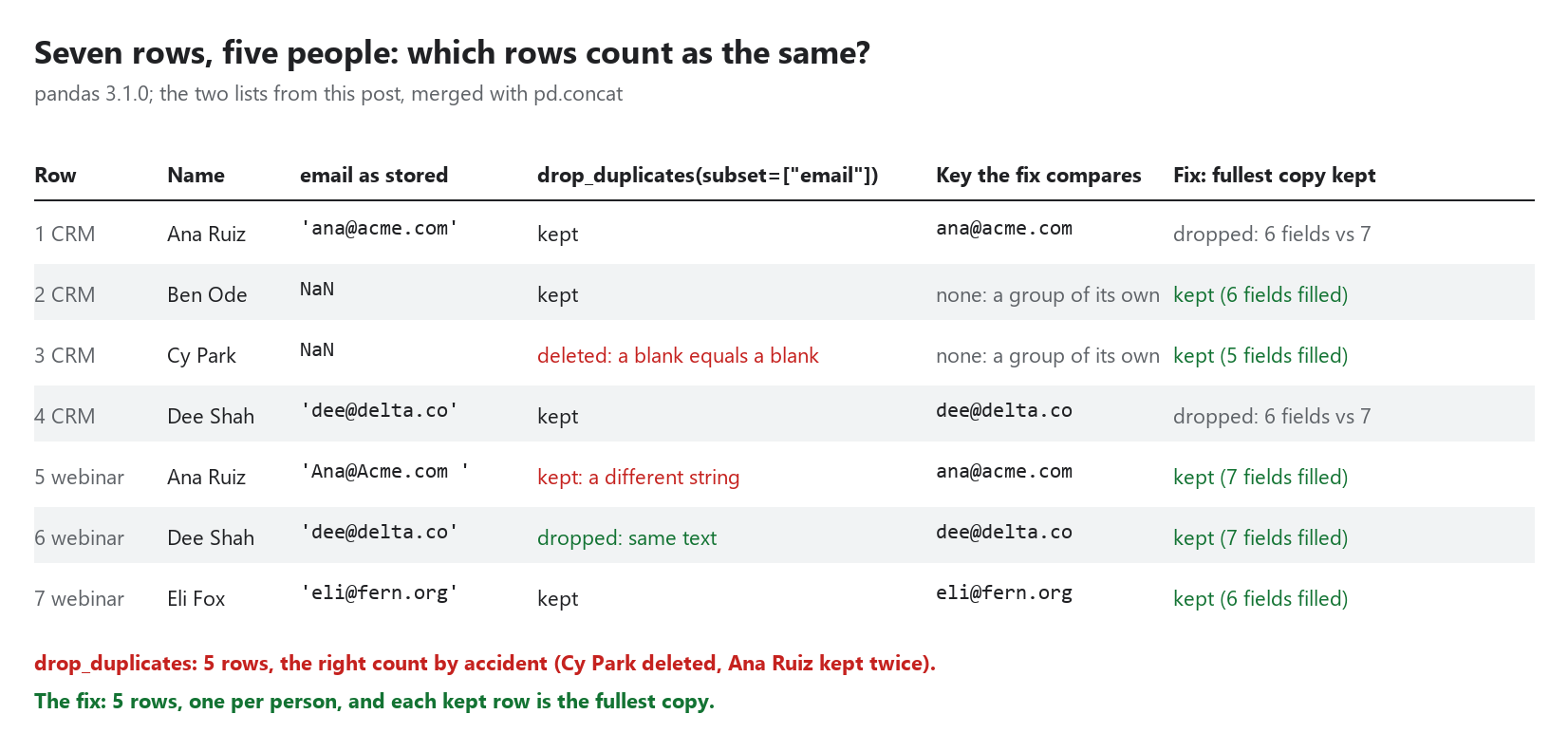
Each red cell is one of the traps below.
Why did drop_duplicates delete a row with no email?
Because pandas treats missing values as equal to each other when it looks for duplicates. Ben and Cy have no email, so their keys are both NaN, and Cy counts as a duplicate of Ben:
both.duplicated(subset=['email']) flags: [False, False, True, False, False, True, False]
Ben and Cy have no email; after drop_duplicates(subset=['email']): True False
Cy Park is gone, and nothing says so. This is the worst of the five, because it deletes a real person rather than leaving an extra one. A missing key means "we can't tell", not "the same as every other blank". Keep those rows out of the duplicate test (key is the email column, normalised as in the next section):
dup = key.notna() & key.duplicated()
deduped = df[~dup]
Why are case and spaces variants not removed?
drop_duplicates compares exact values. The webinar form saved Ana@Acme.com with a capital and a trailing space, so it's a different string from ana@acme.com:
drop_duplicates(subset=['email']): 5 rows
    name         email
Ana Ruiz  ana@acme.com
 Ben Ode           NaN
Dee Shah  dee@delta.co
Ana Ruiz Ana@Acme.com
 Eli Fox  eli@fern.org
Five rows, the right count by accident: one wrong deletion (Cy) and one missed duplicate (Ana). Match on a normalised copy of the key and leave the column itself alone:
key = df["email"].str.strip().str.casefold().replace("", pd.NA)
casefold() is lower() that also handles letters such as the German ß.
Why doesn't 1042 match "1042"?
read_csv guesses types. The CRM's customer_id column became integers, and its zip codes too:
crm zip dtype: int64 first value: np.int64(2134)
crm customer_id: np.int64(1042) | webinar customer_id: '1042'
1042 == '1042' after concat: False
drop_duplicates(subset=['customer_id']): 7 rows of 7
So deduplicating on the ID removes nothing, and Boston's 02134 has lost its leading zero. When the columns are identifiers, read everything as text:
crm = pd.read_csv("crm.csv", dtype=str, keep_default_na=False)
web = pd.read_json("webinar.json", dtype=str)
dtype=str zip: '02134' | customer_id 1042 == '1042': True
keep_default_na=False keeps empty cells as "" instead of NaN, which is why the key above turns "" back into pd.NA before the duplicate test. With these three fixes (text, a normalised key, missing keys left alone) we get the right five people:
rows kept: 5
    name        email    phone
Ana Ruiz ana@acme.com
 Ben Ode              555-0102
 Cy Park
Dee Shah dee@delta.co
 Eli Fox eli@fern.org
Which duplicate does keep="first" keep?
The first one, whatever it holds. Ana's and Dee's phone numbers were only in the webinar list, which came second, so both were dropped with the duplicate row:
Ana's kept phone: '' | the dropped duplicate had: '555-0101'
pandas has no "keep the most complete" option, but it takes three lines. Count each row's filled fields, put the fullest copy first with a stable sort, drop, then restore the original order. Rows with a missing key get a key of their own, so they all survive:
filled = df.replace("", pd.NA).notna().sum(axis=1)
group = key.fillna(pd.Series([f"__row{i}" for i in range(len(df))], index=df.index))
order = filled.sort_values(ascending=False, kind="stable").index
best = df.loc[order][~group.loc[order].duplicated()].sort_index()
most complete per key: 5 rows
    name         email    phone
 Ben Ode               555-0102
 Cy Park
Ana Ruiz Ana@Acme.com  555-0101
Dee Shah  dee@delta.co 555-0104
 Eli Fox  eli@fern.org
Ana's row now comes from the webinar list, so her email is the one she typed, Ana@Acme.com . That's the point of normalising a copy of the key: the data you keep is untouched. Trim it on output if you want it tidy.
How do I match the same website spelled differently?
When there's no email, the company website is the usual key, and it's the messiest field of all. Five spellings of one site:
distinct as text: 5
  'https://www.acme.com/'              -> 'acme.com'
  'acme.com/?utm_source=webinar'       -> 'acme.com'
  'http://acme.com'                    -> 'acme.com'
  'https://acme.com/#pricing'          -> 'acme.com'
  'HTTPS://ACME.COM/?b=2&a=1&gclid=x'  -> 'acme.com?a=1&b=2'
distinct after normalising: 2
The rules: ignore http versus https, a leading www., a default port, a trailing slash and the #fragment; drop tracking parameters (utm_*, gclid, fbclid and friends); sort the parameters that are left. The last one keeps ?a=1&b=2, because a real query parameter can mean a different page. Our version is about 20 lines of urllib.parse:
TRACKING = re.compile(r"^(utm_[a-z0-9_]+|gclid|fbclid|msclkid|dclid|yclid|mc_cid|mc_eid|igshid|_ga)$", re.I)

def normalize_url(text):
    s = text.strip()
    if not re.match(r"^https?://", s, re.I):
        s = "http://" + s
    parts = urlsplit(s)
    host = (parts.hostname or "").lower().removeprefix("www.")
    port = parts.port
    netloc = host + (f":{port}" if port and port not in (80, 443) else "")
    path = re.sub(r"/{2,}", "/", parts.path).rstrip("/")
    query = sorted((k, v) for k, v in parse_qsl(parts.query, keep_blank_values=True) if not TRACKING.match(k))
    return netloc + path + ("?" + urlencode(query) if query else "")
One trap we hit ourselves while writing this post. Our Actor only applied these rules to values that started with http://, https:// or www., so a bare acme.com/?utm_source=webinar stayed a different key. Lead lists are full of bare domains. It now also treats a value as a URL when it looks like a domain (labels, a dot, a top-level label of letters, then the end or a /, ?, # or port), which leaves emails, version numbers like 3.14.4 and ordinary text alone. We shipped that fix today, with a test for each of those cases.
Questions people ask
Does drop_duplicates treat NaN as equal? Yes, as measured above in pandas 3.1.0: two rows whose subset values are all missing are duplicates.
Is 5 the same as "5" and 5.0? Partly, to pandas. In one object column, 5.0 was flagged as a duplicate of 5 (they're equal in Python), but "5" wasn't. Our Actor turns every value into comparable text first, so 5, "5" and 5.0 all become 5.
Will this scale? The pandas version holds every row in memory. The Actor keeps only a 16-byte hash of each distinct key and streams rows through, writing in batches of 1,000.
Try it
If you'd rather not write any of this, the Actor does all five as input fields: dedupFields (one or more fields, dotted paths work), trimming and case on by default, normalizeUrls, keep: "mostComplete", and a choice for rows with empty keys (keep them, which is the default, treat them as one group, or drop them). It reads Apify datasets, CSV, JSON, JSON Lines and Excel files, and writes a summary of what it removed from each source. It costs $0.0002 per row written; duplicates and filtered rows are free. The example merge and dedup lead lists runs it on two lists like these.
Which one has bitten you: the vanished blank, the trailing space, or the zip code that lost its zero? Tell us in the comments.
Comments
Join the discussionNo comments yet. Be the first to comment.