# Read RSS, Atom and JSON Feed in Python: four feedparser traps
**Disclosure:** we built and sell the Apify Actor whose code this post walks through, [RSS, Atom & JSON Feed Reader](https://apify.com/wrentools/rss-feed-reader) (publisher WrenTools). The post was written with AI assistance and reviewed by a person before publishing. Every output below was produced by running that code with feedparser 6.0.14.
**In short:** feedparser is the right tool for RSS and Atom, but four things catch people. It returns zero entries for a JSON Feed, so read that format with `json` yourself. A `str` you pass it is fetched as a URL or opened as a file, so pass bytes. `entry.get("updated_parsed")` quietly returns the published date when the feed gave no updated date; use `dict.get(entry, "updated_parsed")`. An Atom entry without its own author doesn't inherit the feed's. To find a site's feed in the first place, read the `` tags on its home page.
**Prefer to watch?** Our video [Parse RSS Feeds in Python (feedparser): 0 Errors, a Whole Blog Missing](https://youtu.be/RNjz96BzcS0) shows a feed script that reports no errors while a whole blog is missing, and how to catch it (narrated by a synthetic voice).
Reading a feed in Python usually starts and ends with `feedparser.parse(...)`. It handles RSS 0.9x to 2.0, RDF and Atom, tolerates the broken XML you meet in the wild, resolves relative links and strips scripts from HTML. We built a feed reader on it. Here are the four surprises it had to handle, what feedparser actually returned for each, and the fix, then how to find a feed and filter it by date.
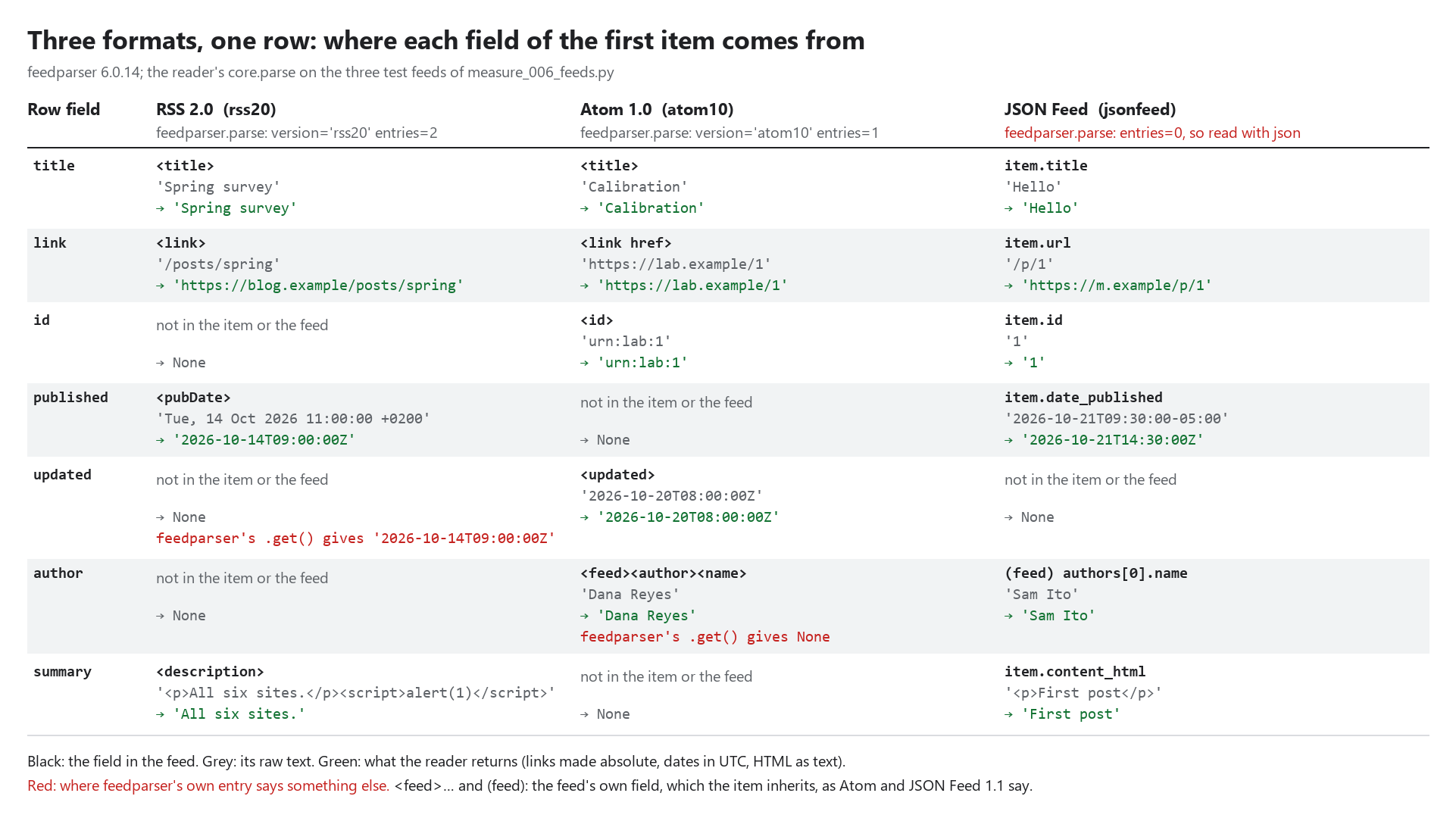
**Predict:** in our three test feeds (one RSS, one Atom, one JSON Feed), no item names its own author, and only the Atom entry gives an updated date. Once our reader has turned each first item into the same row, which rows have an author? Guess, then check the figure.
## Why does feedparser return no entries for a JSON Feed?
Because it doesn't read the format. [JSON Feed](https://www.jsonfeed.org/) (1.0 and 1.1) is a third feed format, alongside RSS and Atom. Given a valid JSON Feed 1.1 document with one item:
```text
feedparser.parse: version='' entries=0 bozo=1
```
No error is raised, so a loop over `entries` just does nothing. It has been asked for on feedparser's tracker: [Support for JSON Feeds](https://github.com/kurtmckee/feedparser/issues/103). The fix is short, because JSON Feed is plain JSON. Check for the version URL, then map the fields:
```python
doc = json.loads(body.decode("utf-8-sig"))
if "jsonfeed.org/version/" not in str(doc.get("version", "")) or not isinstance(doc.get("items"), list):
raise ValueError("JSON, but not a JSON Feed")
feed_authors = doc.get("authors") or ([doc["author"]] if isinstance(doc.get("author"), dict) else [])
for item in doc["items"]:
authors = item.get("authors") or ([item["author"]] if isinstance(item.get("author"), dict) else []) or feed_authors
link = urljoin(base_url, item["url"]) if isinstance(item.get("url"), str) else None
published = _iso_text(item.get("date_published")) # to UTC
...
```
Two details matter. Version 1.0 used a single `author` object and 1.1 uses an `authors` list, so read both. And 1.1 says an item with no authors takes the feed's. Our reader returned this for the same document:
```text
format=jsonfeed entries=1 link=https://m.example/p/1 published=2026-10-21T14:30:00Z author=Sam Ito summary='First post'
```
The relative `/p/1` became a full link, `09:30-05:00` became UTC, and the author came from the feed's top level.
## Why does `feedparser.parse` make a network request?
Because a `str` argument is read as a URL, a file path, or a document, in that order. We started a server on 127.0.0.1 and passed its address as a string, then wrote a feed to a temporary file and passed its path:
```text
feedparser.parse(url string): server requests=1 entries=2
feedparser.parse(path string): version='atom10' entries=1
```
That is handy in a notebook. In a service it means a string from a user can make your process fetch any URL, or read a local file, without going through your HTTP client and whatever limits you put on it: timeouts, size caps, robots.txt, a block on private addresses. Our reader fetches with its own client and passes feedparser the bytes only. The parser refuses anything else, so a refactor can't bring the old path back:
```python
def parse(body: bytes, content_type: str, base_url: str, include_content: bool = False) -> Feed:
if not isinstance(body, bytes):
raise TypeError("parse takes the fetched bytes, never a URL or a path")
...
parsed = feedparser.parse(body, response_headers={"content-location": base_url,
"content-type": content_type or "application/xml"})
```
Passing `content-location` keeps relative links working: the `/posts/spring` link in our test RSS came back as `https://blog.example/posts/spring`.
## Why does an RSS item have an "updated" date the feed never gave?
Because feedparser maps a missing `updated_parsed` to `published_parsed`. Its own source says so, in a `DeprecationWarning`: *"a temporary mapping has been created from `updated_parsed` to `published_parsed` if `updated_parsed` doesn't exist. This fallback will be removed in a future version of feedparser."* For an RSS item with only a ``:
```text
e.get('updated_parsed') is set: True; 'updated' in e: False; dict.get: None
```
So `in` says there is no updated date and `.get()` returns one anyway. Any code that flags items as "edited since publishing" will flag every one. Read the key without the mapping:
```python
"published": _iso(dict.get(e, "published_parsed")),
"updated": _iso(dict.get(e, "updated_parsed")),
```
That gave `published=2026-10-14T09:00:00Z updated=None`, with the `+0200` in the `pubDate` converted to UTC. Because the fallback is marked for removal, code that relies on it will also change behaviour on some future upgrade.
## Where did the Atom author go?
An Atom feed often names its author once, on the ``, and not on each ``. RFC 4287 (s.4.2.1) says such an entry takes the feed's author. feedparser leaves the entry empty:
```text
feedparser entry author: None; feed author: 'Dana Reyes'
```
Apply the rule yourself: the entry's author, then its ``'s, then the feed's.
```python
feed_author = parsed.feed.get("author") if parsed.version.startswith("atom") else None
...
"author": e.get("author") or (dict.get(e, "source") or {}).get("author") or feed_author,
```
Our reader then returned `'Dana Reyes'` for the entry. We don't do the same for RSS: RSS 2.0 has no feed-level author. Its `managingEditor` is an editorial contact, and copying it onto every item would credit the wrong person.
## How do you find a site's feed from its home page?
Many sites announce it in the page's ``:
```html
```
The third tag is `alternate` too, but a translation, not a feed, so check the `type` as well as the `rel`. The standard library's `HTMLParser` is enough. Collect the `` tags whose `rel` includes `alternate` and whose type is RSS, Atom, RDF or JSON Feed, make each `href` absolute, and drop duplicates:
```text
discover: ['https://blog.example/feed.xml', 'https://blog.example/atom.xml']
```
Our reader does this when a URL you give it turns out to be HTML, and reads up to five feeds a page advertises.
## A date cut-off that doesn't lose posts
For a daily digest you want "items from the last day" only. Two choices decide whether that works. Compare in UTC, after converting each item's own offset. And decide what to do with an item that has no date: a cut-off can't judge it, so we keep it rather than drop it silently. On our test feed (one item from 14 October, one undated), measured at noon UTC on 25 October:
```text
'7 days' -> cut-off 2026-10-18T12:00:00+00:00; kept ['Undated note']
'2026-10-14' -> kept ['Spring survey', 'Undated note']
```
An item uses its published date, else its updated date. If you'd rather drop undated items, filter them after the cut-off, where it's visible.
## Questions people ask
**Does feedparser sanitize HTML?** Yes. Given `
All six sites.
` as an item's description, its `summary` was `
All six sites.
`: the script and the event handler were gone. We also turn the summary into plain text (at most 2,000 characters) so it can go in a spreadsheet, which gave `All six sites.`
**Will these still hold after an upgrade?** We measured 6.0.14, the version we pin. The `updated_parsed` mapping above is marked for removal, so re-check that one when you upgrade.
## Try it
The reader is about 240 lines of `core.py` on top of feedparser, and returns one row per item in the same shape for every format, with the feed's title on each row so many feeds can be mixed. Failures (a page with no feed, a robots.txt that disallows the feed) come back as error rows and aren't charged. It costs $0.001 a feed plus $0.0003 an item. Two examples use it: [RSS feeds into a spreadsheet](https://github.com/WrenTools/apify-actor-examples/tree/main/rss-feeds-to-a-spreadsheet), which on each later run adds only the new posts, and [a podcast's episodes into searchable transcripts](https://github.com/WrenTools/apify-actor-examples/tree/main/podcast-episodes-to-searchable-transcripts), which reads each episode's audio link from the feed.
Which feed broke your parser: a JSON Feed, a missing date, or something stranger? Tell us in the comments.